Types of Websites and How to Select the Perfect One for Your Business
Related Insights
Key Takeaways
- •A basic informational website typically costs Rs.25,000-80,000.
- •94% of a visitor's first impression of a website is design-related.
- •Matching website type to actual business goal matters more than any design trend.
- •Most businesses need fewer features than they initially think.
- •The right type today may not be the right type in two years — plan a realistic growth path.
Types of Websites and How to Select the Perfect One for Your Business
"I need a website" is the start of the conversation, not the end of it — a brochure site, an e-commerce store, and a web application are all "websites," but they solve completely different problems and cost dramatically different amounts to build. Choosing the wrong type wastes budget either way: overbuilding for a simple need, or underbuilding for one that actually required more. Here's how to match the type to what your business genuinely needs.
Key Takeaways
- A basic informational website typically costs ₹25,000-80,000, while an e-commerce store or custom web application can run ₹80,000 to several lakh depending on complexity.
- 94% of a visitor's first impression of a website is design-related, per Stanford's web credibility research — meaning the wrong type poorly executed damages trust regardless of what it's meant to do.
- Matching website type to actual business goal (credibility, sales, lead capture, or a functional tool) matters more than any single design trend.
- Most businesses need fewer website "features" than they initially think — scope creep toward unnecessary complexity is a common, avoidable cost driver.
- The right type today isn't necessarily the right type in two years — plan for a realistic growth path rather than over-building from day one.
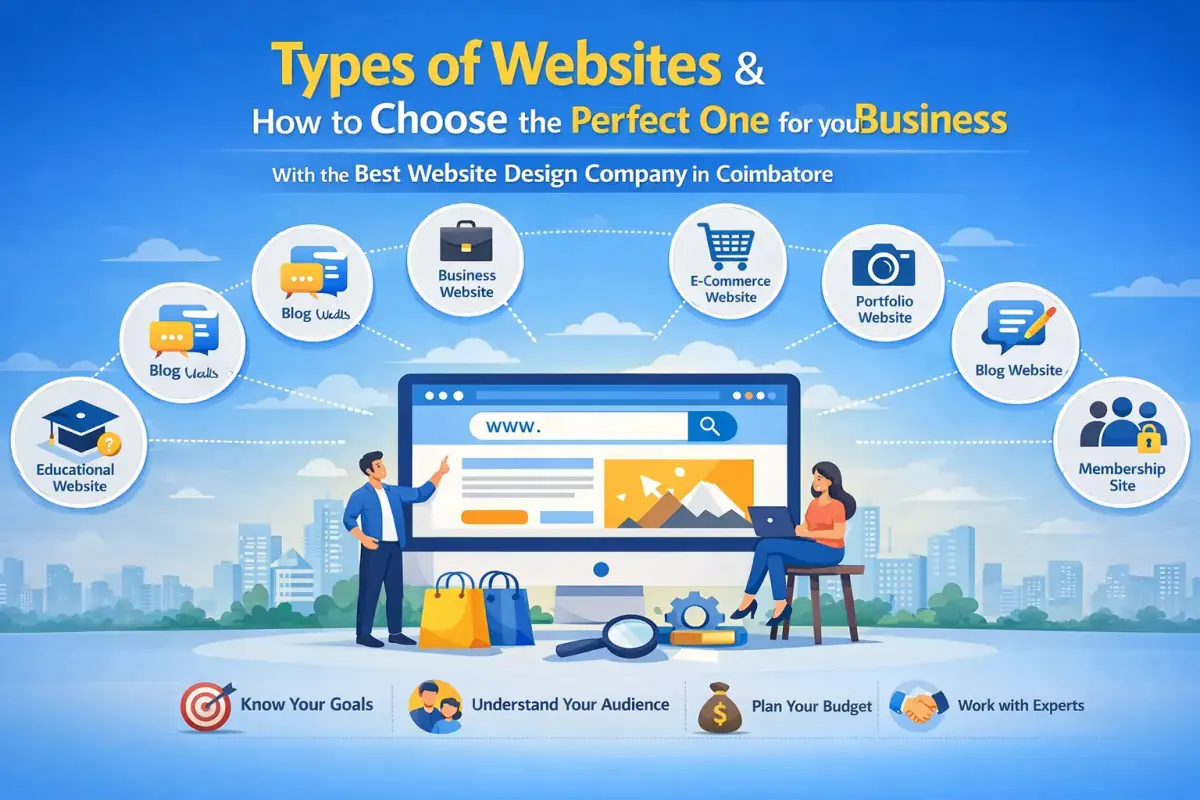
The Main Types of Websites
1. Informational / Brochure Website
A small set of static pages — home, about, services, contact — showcasing what a business does. Best for service businesses whose primary goal is credibility and generating enquiries, not online transactions.
2. Business/Corporate Website
A more comprehensive version of the informational site, often including a blog, case studies, and multiple service pages, aimed at larger or more established businesses needing a broader online presence.
3. E-commerce Website
Built around a product catalog, shopping cart, and payment processing. Essential for businesses that sell products directly online, with functionality ranging from a simple catalog to a complex multi-vendor marketplace.
4. Portfolio Website
Designed to showcase completed work — common for designers, agencies, photographers, and consultants where visual proof of quality drives the buying decision more than written copy.
5. Blog / Content Website
Built primarily around regularly published articles, optimized for organic search traffic and audience building over time rather than direct transactions.
6. Landing Page
A single, tightly focused page built around one specific offer or campaign, typically used to support a paid advertising push with a clear, singular call-to-action.
7. Web Application
Goes beyond static content to provide interactive functionality — booking systems, CRM tools, custom dashboards — essentially software delivered through a browser rather than an installed app.
8. Directory / Listing Website
Aggregates and organizes listings — businesses, properties, jobs — typically monetized through featured listings or advertising rather than direct product sales.
What It Looks Like When It's Working
Scenario: A Coimbatore interior design firm initially wanted an e-commerce-style website to "sell" their services online, assuming more features meant more credibility. After a proper scoping conversation, they instead built a portfolio-focused business website — real project photography front and center, clear service pages, and a simple enquiry form — at roughly a third of the cost of the originally planned e-commerce build.
Enquiries increased meaningfully within two months, because the site finally matched how customers actually made their decision: by seeing real completed work, not by browsing a product catalog that never should have existed for a service business in the first place.
How to Choose the Right Website Type
Step 1: Define your primary business goal for the site
Credibility and enquiries, direct sales, showcasing work, or a functional tool — pick the primary goal first, since it determines which type actually fits.
Step 2: Match complexity to your actual current need, not an aspirational future one
Building a complex web application for a business that just needs to be found and trusted online wastes budget that would be better spent on marketing once a simpler site is live.
Step 3: Consider your growth path realistically
If you genuinely expect to add e-commerce within a year, choose a platform (like WordPress or a headless CMS) that supports that expansion rather than rebuilding from scratch later.
Step 4: Get quotes based on the specific type, not a vague brief
A clear website-type decision makes vendor quotes far more comparable — "a website" produces wildly different quotes, while "a 6-page informational business website" produces consistent, comparable ones.
Common Challenges and How to Overcome Them
"We're not sure if we need e-commerce or just an informational site."
If you're not actively ready to fulfill and ship online orders, start informational and add e-commerce later — it's a cleaner, cheaper path than an underused store sitting unmaintained.
"Our current site doesn't match what our business actually needs anymore."
This is common as businesses grow — audit your current type against your actual current goal, and don't assume a full rebuild is required if a scoped addition (a booking system, a blog) solves the gap.
"We overbuilt and it's expensive to maintain."
Identify which features are genuinely used versus unused complexity — simplifying to match real usage often reduces both cost and ongoing maintenance burden.
Where Smaller Businesses Have an Advantage
- Easier to genuinely match website type to actual need without the internal pressure toward "more features" that larger organizations often face.
- Faster to launch and iterate on a simpler site, getting real market feedback before investing in added complexity.
How Website Type Connects with Other Decisions
Website type directly shapes SEO strategy (a blog-heavy content site needs different SEO work than a landing page), hosting needs (an e-commerce store needs more robust hosting than a static informational site), and marketing channel fit (a landing page pairs naturally with paid ads, while a content site pairs with organic search).
Best Practices for Choosing a Website Type
- Start from your primary business goal, not a list of desired features.
- Match complexity to your current actual need, with a realistic path to grow later.
- Get quotes against a specific, defined website type for genuinely comparable pricing.
- Avoid building for a hypothetical future need before it's actually imminent.
FAQs
What's the cheapest type of website to build?
A simple informational or landing page website is typically the least expensive, running roughly ₹25,000-80,000 for a professional build.
Do I need e-commerce if I mainly generate leads, not direct sales?
No — a lead-generation business is usually better served by an informational or business website with a strong enquiry form than an e-commerce build.
Can a website type change later without a full rebuild?
Often yes, especially on flexible platforms like WordPress, where features like e-commerce or a blog can be added onto an existing informational site.
How do I know if I need a web application instead of a regular website?
If your business needs genuine interactive functionality — bookings, user accounts, custom dashboards — beyond simply presenting information, a web application is the right category.
Conclusion
Choosing the right website type comes down to one honest question: what does this site actually need to do for the business right now? Matching that answer to the right type — rather than defaulting to the most feature-rich option — consistently produces a better return than overbuilding.
If you're not sure which type fits your business, get in touch for a straightforward recommendation.
Share it with your colleagues and social network.